In the property market the first impression is made in a thumbnail. Listings with video stand out, but filming each property with a drone and editing the result is not always worth it, especially for mid priced homes, rentals or country houses far from the office. Artificial intelligence lets you create short videos from the exterior photo you already have. In this guide we tell you which shots work, how to use them and which limits to respect.
Which videos can be created from a photo of the facade
Aerial shot
The camera takes off from the photo and rises above the house, placing it in its surroundings. It is the closest thing to a drone shot. At Vidia it is the drone view.
Entrance walkthrough
A flight towards the door or porch that gives the feeling of arriving at the house and going in. At Vidia it is fly through the scene.
Day to night
The facade goes from midday to dusk in a single shot, with the windows and garden lights switching on. It is the shot that grabs the most attention on social media. At Vidia it is day to night, in HD.
The three shots together, with the same photo, make up the Property in 3 shots pack, three 8 second videos for the price of two.
How to take the ideal photo
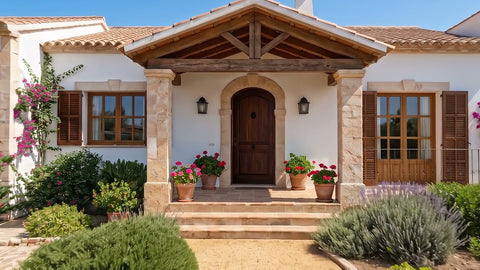
- Exterior and in daylight, with the sky visible. Sunset photos do not work for the change to night.
- Horizontal, from the street or the garden, at eye level and facing the facade.
- Complete facade, with the roof and some space above.
- Visible entrance, door, porch or doorway, so the walkthrough has a way in.
- No obstacles. No cars in front, no people, no bins and no watermarks from other portals.
If the property is a flat in a building, a photo of the building works, but the video will show the building and not your particular flat.
How to use the videos in your strategy
On the portal
If the portal accepts video, upload the horizontal version. You can join the three clips from the pack into a single 24 second video with any simple editor, starting with the drone and ending with the night.
On social media
Ask for the vertical format for Reels, TikTok and stories. A good structure is to open with the day to night change, which hooks people, and add the text with the price and the area on the social network itself.
When winning over owners
Showing an owner how you would present their home, with a video made in minutes during the valuation visit, is a way to set yourself apart from other agencies.
On your website
As the header of each property page or in a new listings section.
Transparency, the most important thing
A video created with AI from a photo is a recreation. At Vidia the effects do not add furniture, renovations or buildings, but everything that appears outside the photo, such as the terrain seen from above or what is behind the door, is imagined by the AI. That is why we recommend three things.
- Say it is AI. A text like “video created with AI from a photo” in the listing. When the video could be mistaken for a real recording and you use it in your professional activity, Article 50 of the European Artificial Intelligence Act requires it.
- Do not use it to hide flaws. The video complements the real photos, it does not replace them.
- Check the result. If something does not look like the property, ask for the free redo or do not publish it.
All Vidia videos also carry an invisible watermark, SynthID, and metadata that identify them as AI generated content.
Common mistakes
- Using interior photos for the drone view. Without sky or horizon, the effect has nowhere to rise to.
- Night or sunset photos for the change of light. There is no transition to make.
- Very tight vertical photos. They cut off the roof and the surroundings.
- Publishing without an AI notice. It creates mistrust if the buyer notices, and in professional use it is an obligation.
An example of use in an agency
An agency takes on a terraced house with a garden. On the day of the visit, the agent takes an exterior photo of the facade in the middle of the morning, from the front and from the pavement. Before going back to the office they buy the Property in 3 shots pack in horizontal format for the portal and, making use of the 3 for 2, another day to night in vertical for social media. In a few minutes they have all four videos. They join the three horizontal ones into a 24 second clip for the listing and post the vertical one as a Reel with the price and the area in the text, saying in both that it is a video created with AI from a photo.
Checklist before publishing
- The photo is an exterior, in daylight and with the complete facade.
- You have watched the videos in full and they look like the property.
- The listing says the videos were made with AI.
- The real photos of the home are still in the listing.
- You have downloaded the videos within the 48 hours they are available.
If you sell your home without an agent
The same works for a private owner selling or renting their house, villa or country home. You do not need an account or a subscription, you pay only for the videos you want and in a few minutes you have them for the portal, WhatsApp and social media. Take the photo of the facade in the middle of the morning, from the front and in horizontal format, and always accompany the video with real photos of the interior.
Which properties benefit most
Houses with a garden, country houses and villas look best, because the drone view has surroundings to show and the change to night has garden lights and windows to switch on. Ground floor commercial premises also work well with the entrance walkthrough. For flats inside a building, the video is more useful for presenting the building or the area than the home itself.
How much it costs
Each effect is paid for separately, and the pack with all three costs the price of two, taxes included. There is no subscription. Each video includes a free redo before downloading it and, if it cannot be created or is not ready within 24 hours, we refund your money automatically. You will find more details in videos for estate agents.